
XME TRIGGERS
XME Inc.Music & Audio
4.816.00 Reviews
- Version
- 2.0.4
- Installs
- 10.00K
- Age Rating
- Everyone
Screenshots
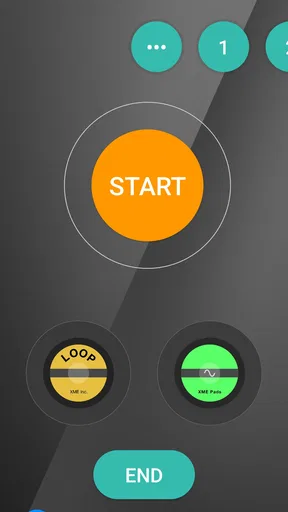
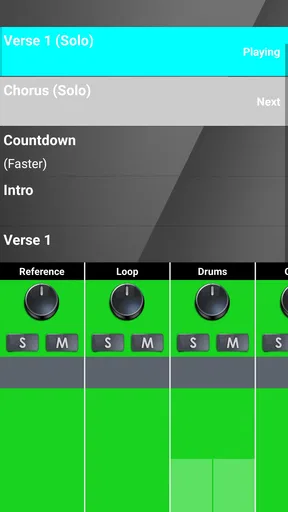
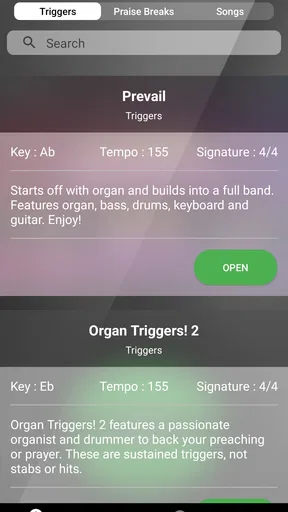
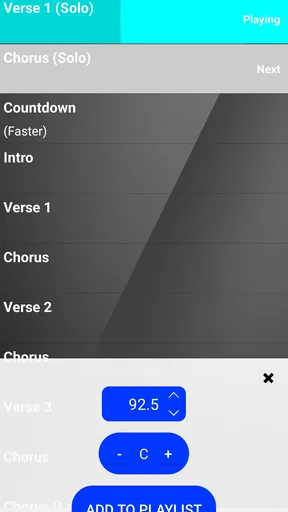
Our Review of XME TRIGGERS
 Analysis by Appyee
When I first opened XME TRIGGERS, I understood the appeal quickly: it is a music and audio app built around worship use, with a focused purpose rather than an attempt to replace every audio tool on my phone. The idea is simple to grasp, but the real question is whether that usefulness survives after the first enthusiastic week. In my experience, this kind of app earns a permanent place only when it becomes part of a repeatable routine instead of something I open once to explore.
That makes XME TRIGGERS worth judging differently from a normal music player. I would not choose it because I want a broad catalog, casual listening, or a general-purpose audio library. I would consider it when I need a dependable worship-oriented tool that can support preparation, rehearsal, or live moments without adding unnecessary complexity. Its free entry point makes trying it easy, although the presence of optional purchases means I would still inspect the available options carefully before building an important workflow around it.
How XME TRIGGERS Holds Up Beyond the First Week
After the first week, I’d look beyond whether XME TRIGGERS feels promising and ask whether more than one person can use it comfortably and consistently. I’d rotate the operator during a rehearsal and keep a simple fallback plan, so a familiar routine doesn’t depend on one person’s memory or availability. That longer trial also helps reveal which parts of the workflow deserve attention next.
A focused first impression for worship preparation
The strongest part of the first week is the app’s narrow identity. XME Inc. has positioned it clearly in Music & Audio, and that clarity helps me decide where it belongs. Instead of treating it like a conventional streaming service, I approach it as a practical companion for worship-related audio tasks. That distinction matters because the value is less about endless discovery and more about whether the app helps me move from preparation to execution with fewer distractions.
A realistic everyday scenario would be a worship team member preparing for a weekend service. I might open the app while reviewing the order of a set, checking how a trigger-based workflow fits into rehearsal, and then returning to it later when making final adjustments. The useful habit is not simply launching the app; it is keeping the preparation process consistent. I would use the same device, the same rehearsal window, and the same checklist each time so that the app supports the routine rather than becoming another item to remember.
During that first period, I would also test it under ordinary pressure instead of judging it only in a quiet room. A tool can feel smooth while exploring and still be awkward when I need to find something quickly. I would therefore practice opening the relevant material, moving through the controls, and recovering from an interruption. This is one of the less obvious ways to evaluate an app like this: the best workflow is the one I can repeat when my attention is already divided.
The app’s average rating of 4.8, drawn from around 126 ratings, suggests that many users have found its focused approach worthwhile. I treat that as encouraging rather than conclusive. A high average can tell me that the core idea resonates, but it does not answer whether the app fits my specific worship setup or whether I will continue using it after the novelty fades. The first week should therefore be a practical trial, not just a tour of the interface.
Where it can fit better than ordinary audio alternatives
Compared with a general music player, XME TRIGGERS has a more intentional role. A regular player is usually designed for listening, browsing, playlists, and personal entertainment. Those tools may be better when I want a wide range of songs or a familiar library, but they can also introduce extra steps when my goal is to support a worship moment. The advantage here is the possibility of a more direct relationship between preparation and use.
Compared with manually managing audio files, a dedicated app can also reduce the mental overhead of remembering which item belongs to which part of a service. That said, I would not assume that a specialized app automatically replaces every existing tool. If my team already has a reliable system for organizing tracks, rehearsing transitions, and handling live audio, changing everything at once could create more risk than benefit. I would introduce XME TRIGGERS in one limited workflow first, then expand only after the team understands how it behaves in practice.
This is also where the app’s free price helps. I can evaluate the basic experience without making an immediate financial commitment. However, free access should not be confused with a completely cost-free long-term setup. In-app purchases range from $9.99 to $109.99 per item, so I would identify which parts are genuinely necessary before recommending it to a whole team. A low-friction trial is useful, but a recurring worship workflow deserves a clear budget conversation.
The first-month test: does it become a habit?
After the initial excitement, the important test is whether I still have a reason to open the app during an ordinary week. For me, lasting value would come from using it at predictable points: while planning, during rehearsal, and before a service. If I only launch it when I am curious about a new feature, the app is probably not solving a regular problem. If it consistently shortens preparation or makes a repeated task easier, it has a stronger case for staying installed.
One practical method is to assign the app a specific job rather than asking it to handle the entire audio environment. For example, I might use it for trigger preparation while keeping other tools responsible for communication, song planning, or broader playback. This separation makes maintenance easier and gives me a clearer answer about what the app contributes. It also prevents the common mistake of expecting a specialized tool to become the center of every part of a team’s process.
The developer, XME Inc., has released the app as version 2.0.4, and it supports devices running operating system version 10 or later. Those details matter when deciding whether a shared device can participate. I would check the actual rehearsal and service devices before committing, especially if a team relies on an older phone or tablet. A workflow that works on one modern device may not be practical if the person responsible for it cannot install the app on the equipment they normally use.
The app has passed the early adoption stage with over 10,000 installs, which gives me more confidence that it is not merely an abandoned experiment. Still, install volume does not guarantee that it will match my team’s habits. The better question is whether the people who need to use it can learn the workflow quickly and remember it between services. That is why I would judge it over several real preparation cycles rather than after one impressive demonstration.
Maintenance is the real cost of a specialized workflow
Every worship tool creates maintenance, even when the app itself feels simple. I need to keep the relevant material organized, confirm that the right device is available, and make sure the person operating the workflow knows what to do. XME TRIGGERS can earn long-term value only if those responsibilities remain small enough for a volunteer team to handle without resentment.
I would create a short pre-service routine around it. First, I would verify the device and its battery. Next, I would review the planned order and test the important moments without waiting until the room is full. Finally, I would make sure another team member knows the basic recovery steps. This is not glamorous, but it is the difference between an app that supports a service and an app that becomes a single person’s fragile specialty.
A particularly useful habit is to avoid changing several things immediately before a service. If I add new material, reorganize the workflow, and switch devices on the same day, I lose the ability to identify the cause of a problem. I would make changes during rehearsal, record what changed in plain language, and leave a stable version ready for the event. This approach reduces fatigue and makes the app easier to hand over to someone else.
I would also keep expectations realistic about what “maintenance-free” means. A dedicated worship app may reduce some manual effort, but it cannot remove the need for preparation. The team still has to decide what should happen, when it should happen, and who is responsible. If the app is treated as a shortcut around planning, its weaknesses will become more visible. If it is treated as one part of a disciplined process, its focused design makes more sense.
Where long-term fatigue can appear
The first source of fatigue is repetition without a clear payoff. If I open XME TRIGGERS every week but still perform most of the same work elsewhere, the extra step will eventually feel unnecessary. This is why I would measure its value in saved attention, not just in the number of times it is launched. The app needs to make a meaningful part of worship preparation easier, clearer, or more dependable.
The second source is dependence on one experienced operator. A workflow may feel excellent when the person who created it is present, then become confusing when a substitute takes over. I would deliberately ask another team member to follow the process after a rehearsal. If they need constant explanations, the problem may not be the person; the workflow itself may need simplifying.
The purchase structure can create another point of friction. Because individual in-app purchases can reach $109.99, I would avoid assuming that every available option belongs in a sensible starter setup. I would begin with the smallest configuration that addresses the team’s actual need, then evaluate whether additional spending produces a clear improvement. This is especially important for small congregations or volunteer groups that need predictable costs.
There is also a difference between a tool that is excellent for a particular worship environment and one that suits every environment. If my priority is broad music discovery, personal listening, or a large general audio library, a conventional music app may be a better fit. If my team prefers a completely manual setup and already has strong procedures, the learning curve may not justify a switch. XME TRIGGERS is most convincing when its specific purpose matches a repeated problem.
Who should keep using it, and who should move on?
I would recommend keeping it installed if I regularly participate in worship preparation and want a focused audio workflow that can be practiced before a service. It is also a reasonable option for someone who values a dedicated tool over a crowded general-purpose player. The Everyone content rating makes it broadly approachable from an age-classification perspective, while the free starting price allows a team to explore the fit before deciding how much to invest.
I would be more cautious if I rarely handle worship audio, if my device does not meet the operating-system requirement, or if I am looking for a normal streaming experience. I would also hesitate if my team cannot agree on who owns the preparation and backup process. No app can compensate for unclear responsibility. In that situation, a simpler shared routine may be more valuable than adding another specialized application.
For someone deciding today, my advice would be to run a controlled trial across several rehearsals. Use one real service workflow, involve at least one backup operator, and note whether the app reduces preparation effort or merely relocates it. Before buying anything, identify the exact purchase that would be needed and whether the benefit would be visible to the whole team. That test gives a more honest answer than relying on the first week’s excitement.
My long-term verdict
XME TRIGGERS has a credible chance of earning lasting space because it is specific. Its appeal is not that it tries to be every kind of audio app; it is that it gives worship users a focused place to build a repeatable trigger-oriented routine. I appreciate that the free entry point makes experimentation straightforward, and the strong user response gives the app a positive starting reputation.
My reservation is that specialization creates responsibility. The app will stay useful only if I maintain a clear workflow, test it before important moments, and avoid buying more than the team truly needs. It is not the right choice for casual listeners or for groups that already have a simpler system that works. The recurring value comes from dependable preparation, not from novelty.
After the first month, I would keep it if it had become a quiet, predictable part of the worship process: opened with a purpose, understood by more than one person, and trusted because it had been rehearsed. That is the standard I would use with any paid upgrade as well. XME TRIGGERS earns its place when it reduces uncertainty without creating a new maintenance burden. For worship teams with that exact need, I think it is worth trying; for everyone else, a conventional audio tool may remain the more sensible choice.
Verdict
Strengths of XME TRIGGERS
- Quick access to emergency contacts during stressful situations.
- Supports discreet activation options for greater personal safety.
- Simple interface that is easy to understand and configure.
- Useful for travelers, commuters, and people living alone.
- Can provide reassurance without requiring complicated equipment.
Limitations of XME TRIGGERS
- Requires careful setup to avoid accidental emergency alerts.
- Some features may depend on phone permissions and connectivity.
- Battery usage could increase if location services run continuously.
- Emergency response availability may vary by country or region.
- Users should test triggers regularly to ensure they work properly.
Other Releases by XME Inc.
View All
Worship Backing Tracks
Music & Audio4.7

XME LOOPS
Music & Audio4.5
Similar Picks in This Category
View All
YouTube Music
Google LLC4.4

Samsung Music
Samsung Electronics Co., Ltd.3.8

Spotify: Music and Podcasts
Spotify AB4.3

JioSaavn - Music & Podcasts
Saavn Media Limited4.3

Lark Player:Music Player & MP3
Lark Player Studio - Music, MP3 & Video Player4.6

StarMaker: Sing Karaoke Songs
SKYWORK AI PTE. LTD.4.3
Frequently Asked Questions
What is XME TRIGGERS and what does it do?
XME TRIGGERS is designed to help users create or manage automated actions based on specific events, conditions, or triggers. Depending on the version and device, it may connect with compatible services, apps, or system functions to perform tasks automatically. Before downloading, check the official description carefully because available triggers, actions, and integrations can vary between Android and iOS.
Is XME TRIGGERS free to download and use?
The application may be available as a free download, but some features could require in-app purchases, a subscription, or access to a premium version. We recommend reviewing the store listing before installing it to confirm the current pricing model. Also check whether the free version includes the triggers and automation tools you actually need, since important functions may be limited.
Is XME TRIGGERS safe and does it protect my privacy?
As with any automation or utility app, XME TRIGGERS may request permissions that are necessary for detecting events, accessing connected services, or carrying out actions. Install it only from an official app store and review every permission request carefully. You should also read the developer’s privacy policy to understand what information is collected, whether data is shared, and how connected accounts are handled.
Which devices and operating systems are compatible with XME TRIGGERS?
Compatibility depends on the version of XME TRIGGERS available for your platform and the features supported by your phone. Before downloading, verify the required Android or iOS version, device restrictions, and any additional service or hardware requirements. Some triggers may work differently across platforms, while certain background automation features can be limited by operating-system security and battery-management settings.
Does XME TRIGGERS require an internet connection or technical setup?
Some basic functions may work directly on the device, while cloud-based integrations, account synchronization, notifications, or remote actions may require an active internet connection. Setting up triggers can also involve granting permissions, signing in to external services, and testing conditions to ensure they work correctly. Users who are new to automation should expect a short learning period before creating reliable workflows.
